Android
- Minimum OS: Android 5.0 (Lollipop) or higher
- Installation: APK direct download from luckyelf.app
- Stores: Not listed on Google Play; install directly from the casino
App at LuckyElf Casino in Australia: System Requirements
Take your LuckyElf account with you - play 4000+ games including Evolution Gaming live tables and Pragmatic Play pokies directly from your phone.
How to Install LuckyElf on Your Device
LuckyElf App Strengths and Limitations
Pros
Cons
Play LuckyElf Anywhere, On Any Device
Take your LuckyElf account with you - play 4000+ games including Evolution Gaming live tables and Pragmatic Play pokies directly from your phone.
Get the App Casino games carry a risk of gambling addiction. You must be at least 18 years old to play. All bonus offers are governed by their own terms and conditions.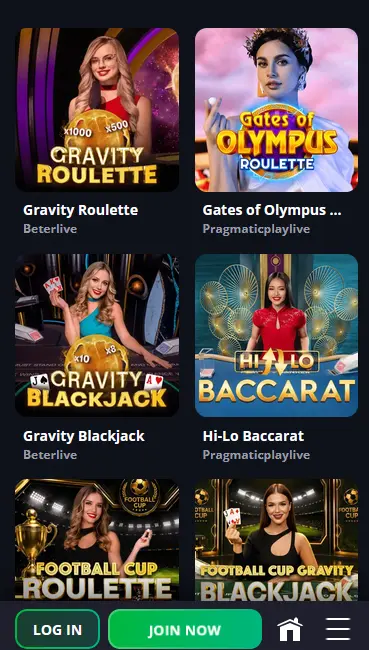
Mobile Security Practices
What You Should Do
What You Should Avoid
Device Compatibility
Android
iOS
What the LuckyElf App Delivers
Full Lobby in Your Pocket
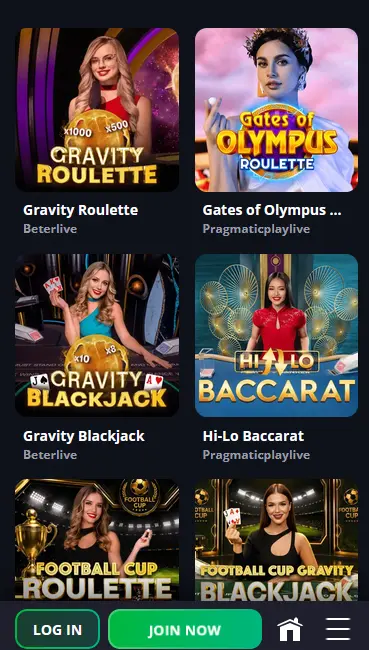
The Android APK brings over 2,600 games to your phone, including pokies from BGaming and Play'n GO, live dealer tables from Evolution Gaming, and instant-win titles like Aviator.
Fast Loading and Smooth Gameplay
The app is optimised for mobile hardware, cutting load times compared to a standard browser tab and delivering stable streams on live dealer tables from Evolution Gaming and Ezugi.
Secure Login with Biometrics
Fingerprint and face ID login are supported on compatible Android devices, giving you fast secure access without typing your password on every session.
LuckyElf Casino has built its mobile platform to give Australian players the complete casino experience on any device, without sacrificing game quality or access to account features. The dedicated Android APK is a standalone application that loads the full game library, the cashier, live chat support, and bonus management without requiring a browser. For iOS users, the mobile-optimised website delivers equivalent functionality through Safari or Chrome, with a home screen shortcut that launches the site in a dedicated window. Both routes connect to the same account, the same balance, and the same bonus eligibility.
The Android app adds push notifications for bonus drops, promotional events, and deposit confirmations, keeping you informed even when the casino is not in the foreground. Biometric login through the app removes the need to type credentials on every visit, a practical advantage during short gaming sessions.
Because Google Play does not host real-money casino apps for Australian players, the LuckyElf APK is available directly from the casino website. The process is straightforward and takes under two minutes.
Go to your Android device’s Settings, navigate to Security or Privacy, and activate the option to allow installation from unknown sources or from your browser specifically. Once that permission is in place, open your browser, visit luckyelf.app, and tap the Android download icon in the footer. The APK file downloads automatically. When the download finishes, tap the file in your notifications bar or in your Downloads folder and follow the on-screen prompts to complete installation. The LuckyElf app icon will appear on your home screen.
iOS users access LuckyElf through Safari without needing to visit the App Store. Open Safari on your iPhone or iPad and navigate to luckyelf.app. Once the site loads, tap the Share icon at the bottom of the screen (the square with the upward arrow), scroll through the options, and select “Add to Home Screen”. Give the shortcut a name if you like, then tap “Add”. The icon appears immediately on your home screen and launches the site in a full-screen window without the browser toolbar, providing a near-native experience on devices running iOS 13 or above.
| Feature | Android | iOS |
|---|---|---|
| Minimum OS | Android 5.0+ | iOS 13+ |
| Installation method | APK from luckyelf.app | Safari “Add to Home Screen” |
| App Store availability | Not on Google Play | Not on Apple App Store |
| Biometric login | Supported | Via device browser settings |
| Game access | 2,600+ titles via APK | Full lobby via mobile browser |
The Android app and iOS browser both give you access to thousands of pokies from Pragmatic Play, BGaming, Play’n GO, Nolimit City, Yggdrasil Gaming, Hacksaw Gaming, and more. Megaways titles like Money Men Megaways from iSoftBet load smoothly on mobile, and BGaming’s LuckyElf Bonanza and Bonanza Billion are among the featured pokies linked to the welcome bonus free spins.
Evolution Gaming and Pragmatic Play Live tables stream in HD at full frame rates on current Android and iOS devices. Lightning Roulette, classic and Infinite Blackjack, Speed Baccarat, and game shows like those from the Evolution catalogue are all accessible from the mobile interface. Ezugi’s Andar Bahar and VIVO Gaming tables round out the live section.
The full range of table games, including roulette, blackjack, baccarat, and video poker, is available on mobile. Instant-win titles Aviator and Spaceman by Spribe, and PlinkoX from Turbo Games, are optimised for portrait and landscape play, making them ideal for shorter mobile sessions.
The jackpot section, featuring titles from BGaming, Platipus, and 1Spin4Win with growing progressive prize pools, is fully playable through both the Android app and the iOS mobile browser.
The four-deposit welcome package of up to A$8,000 plus 350 free spins is fully claimable through the mobile app’s cashier. Enter code ELF1 with your first deposit of at least A$20 to start. All four deposit stages and their corresponding free spins on LuckyElf Bonanza, Bonanza Billion, and Book of Cats (BGaming) are accessible from the app. 18+ only. T&Cs apply. Please gamble responsibly.
| Method | Deposit | Withdrawal | Speed |
|---|---|---|---|
| Visa / Mastercard | Yes | Yes | Deposits: instant; Withdrawals: 1-5 days |
| Skrill | Yes | Yes | Deposits: instant; Withdrawals: 0-1 hours |
| Neteller | Yes | Yes | Deposits: instant; Withdrawals: 0-1 hours |
| Bitcoin (BTC) | Yes | Yes | Deposits: instant; Withdrawals: within hours |
| Ethereum (ETH) | Yes | Yes | Deposits: instant; Withdrawals: within hours |
| Neosurf | Yes | No | Deposits: instant |
All cashier functions are available through the app, including selecting a deposit method, entering an amount, applying a promo code, and initiating withdrawals.
If you are a new player, you can register directly through the Android app or the mobile browser. The process requires an email address and password. After submitting the registration form, verify your email address via the confirmation link in your inbox to activate your account. KYC documents including a government-issued ID may be requested before your first withdrawal is processed.
Enter your registered email and password on the login screen. The Android app supports biometric login once you have enabled it in account security settings, letting you authenticate with your fingerprint or face ID. On iOS, your device’s keychain or password manager can fill credentials automatically in the mobile browser.
All data transmitted through the LuckyElf app is protected by SSL encryption. The Android APK supports biometric authentication as an alternative to password entry for returning sessions.
Two-factor authentication can be enabled through the security settings in your account profile. Once active, a verification code is required at login in addition to your password, providing an additional layer of protection.
Live chat is accessible from within the Android app and the mobile browser at any time, 24/7. Tap the chat icon to connect directly to a support agent. Email queries can be sent to [email protected]. Both channels cover payment queries, bonus wagering questions, account verification, and technical support.
All responsible gambling tools available on desktop, including deposit limits, wager limits, session timers, time-out periods, and self-exclusion, are accessible through the account settings in the mobile app. LuckyElf encourages players to set these limits before they begin play. Please gamble responsibly and within your means.
App Queries Answered
Google Play's policies restrict real-money casino apps in Australia, so the LuckyElf Android APK is distributed directly from luckyelf.app. The installation process takes under two minutes once unknown sources are enabled in your device settings.
Yes. The mobile browser version of LuckyElf on iOS gives you access to the full game catalogue, including Evolution Gaming live tables, Pragmatic Play pokies, and instant-win titles like Aviator by Spribe.
All payment methods available on the desktop site, including Skrill, Neteller, Bitcoin, Ethereum, Visa, and Mastercard, are fully accessible through the Android app's cashier section.
Get LuckyElf on Your Phone
Grab 100% up to A$8,000 and 350 free spins.
Enter the Casino Casino games carry a risk of gambling addiction. You must be at least 18 years old to play. All bonus offers are governed by their own terms and conditions.